The Three Email Triggers That Convert (And How to Set Them Up in HighLevel Without Coding)
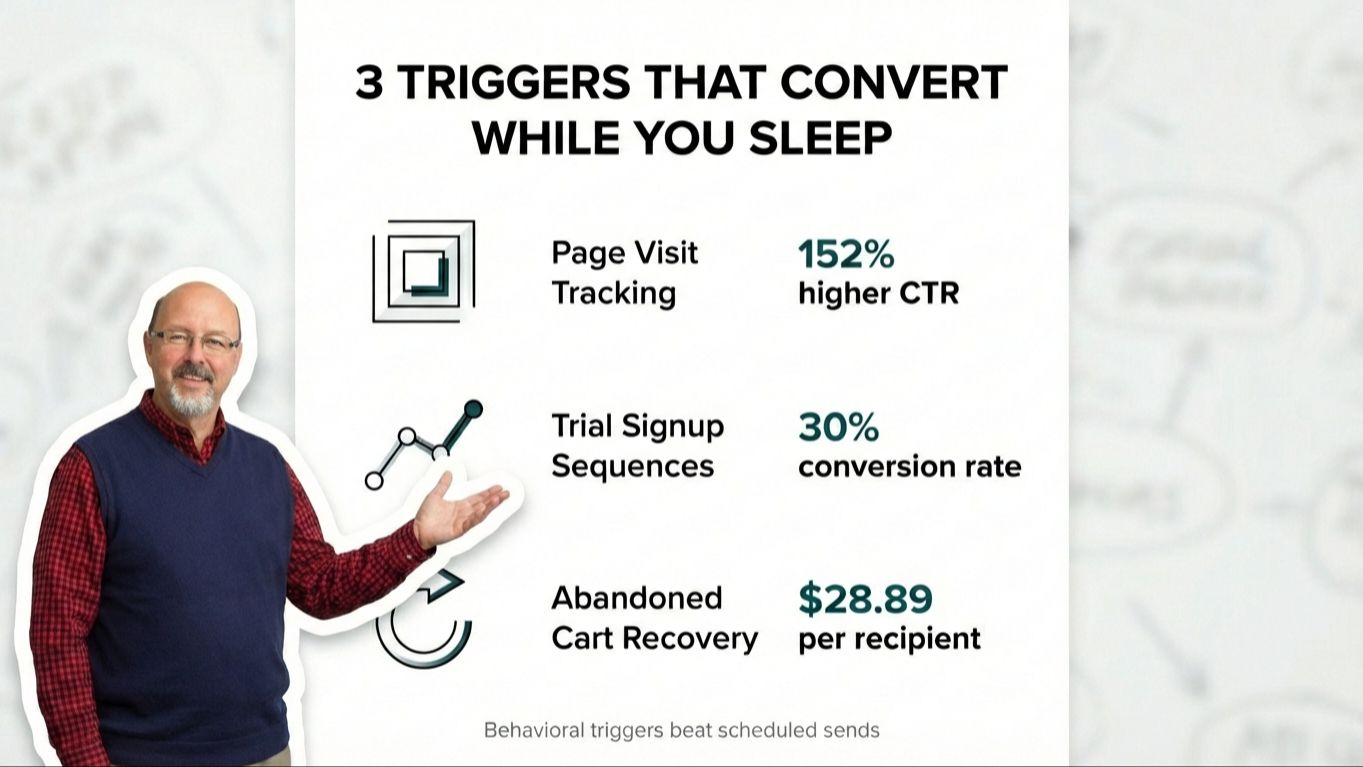
TL;DR: Three email triggers deliver measurable revenue: page visit tracking (catches high-intent buyers), trial signup sequences (converts 30% when done right), and abandoned checkout recovery ($3.65 average revenue per email). HighLevel's visual workflow builder makes setup accessible without coding. Start with one trigger, test it, then scale.
Quick Answer: Which Triggers Matter Most?
-
Page visit tracking: Responds when someone views your pricing page 3+ times in 7 days, signaling serious buying intent
-
Trial signup sequences: Guides new users through activation in days 0-14, converting 30% of engaged trial users into customers
-
Abandoned checkout recovery: Three-email sequence (30 min, 24 hours, 72 hours post-abandonment) recovers 70% of the $260B in abandoned carts annually
-
Why behavioral beats scheduled: Timing trumps creative; context beats content; messages sent at decision moments convert 152% better
Two decades watching people buy tools they never activate taught me something uncomfortable.
The software works. The features exist. But between purchase and implementation sits a gap that swallows good intentions.
Email automation triggers are one of those dormant features. You know you should use them. The stats look compelling. But setup feels murky, so you default to manual sends while conversion rates flatline.
Here's what building these workflows taught me: three triggers outperform everything else combined.
Page visit tracking. Trial signup sequences. Abandoned checkout recovery.
Not theoretical. Implemented. Tested. Watched them generate real revenue in real businesses.
HighLevel's workflow builder makes them accessible. No code required.
Why Behavioral Triggers Beat Scheduled Emails
Scheduled emails send when you decide.
Behavioral triggers fire when your customer signals intent.
The numbers tell the story. Behavioral trigger campaigns deliver 152% higher click-through rates. They generate 40% more revenue per recipient compared to scheduled campaigns.
Performance gaps exist because timing matters more than creative.
Someone visits your pricing page three times in one day. They're not browsing. They're deciding. A trigger-based email arriving 30 minutes later catches them mid-decision.
Someone abandons a cart. The optimal first email hits 30 minutes post-abandonment. Wait three days and the window closes. Average cart abandonment sits at 70.19%, representing $260 billion in recoverable revenue annually.
The psychology is straightforward: context beats content.
When your message arrives matters more than what you say. A mediocre email at the right moment outperforms brilliant copy at the wrong time.
Key insight: Behavior-triggered emails convert because they respond to demonstrated intent, not assumed interest. The customer tells you what they want through their actions.
What Is Page Visit Tracking and Why Does It Signal Intent?
Page visit tracking shows you what people care about before they speak up.
Someone visiting your pricing page five times in one week differs from someone reading one blog post. Someone spending 10 minutes on product features signals higher intent than someone bouncing after 30 seconds.
Real-time triggered segmentation responds to immediate user actions rather than waiting for scheduled sends. Visitor tracking helps you identify high-value traffic sources and prioritize leads showing strong intent.
How to Set Up Page Visit Tracking in HighLevel
Step 1: Install tracking code on key pages
Your pricing page, product demo page, and checkout page need tracking. These are high-intent destinations. Someone visiting repeatedly is closer to buying than someone skimming blog content.
Step 2: Create a workflow triggered by page visits
In HighLevel's workflow builder, start with this trigger: "Contact visits specific page." Set the page URL. Add a condition: "Has visited X times in Y days."
I use "3 visits in 7 days" for pricing pages. Enough signal to indicate serious interest without crossing into aggressive territory.
Step 3: Build your response sequence
The first email acknowledges interest without feeling invasive. "I noticed you've been checking out our pricing" reads creepy. "Here's what most people want to know about our plans" reads helpful.
Include the specific information they're seeking. For pricing page visitors, that's comparison details, implementation timeline, or ROI data.
Step 4: Add wait periods and follow-ups
Wait 2-3 days. If they haven't converted, send a second email with social proof or a case study relevant to their industry.
Match message to behavior. Someone researching pricing wants different information than someone comparing features.
Bottom line: Page visit tracking converts because you're responding to demonstrated curiosity, not interrupting with random outreach.
How Do Trial Signup Sequences Convert New Users?
Trial users who don't engage early convert at dismal rates.
The data confirms this. A trial conversion rate of 30% is superb. Average sits around 15-20%. Converting less than 10% of trial users means you're sending wrong emails in wrong order.
Welcome emails achieve open rates 2x higher than any other email because recipients are at peak interest. They converted into a subscriber and trust your brand.
The Trial Sequence That Converts 30% of Engaged Users
Day 0: Welcome and first action
The welcome email fires immediately after signup. Confirms account, provides login details, directs them to one specific action.
Not five actions. One.
For marketing automation, that's "Create your first workflow." For content tools, it's "Generate your first piece."
The goal is activation, not education. Get them experiencing value in the first session.
Day 2: Check-in and guidance
This email checks whether they completed the first action. Completed? Congratulate them and suggest next step. Didn't complete? Offer help or a video walkthrough.
HighLevel's workflow builder lets you add conditional logic here. "If contact completed workflow, send Email A. If not, send Email B."
Day 5: Value reinforcement
By day five, you know engagement status. Engaged users get advanced features. Dormant users get "We noticed you haven't logged in" with a direct offer to help.
Day 10: Social proof and urgency
This email includes a case study or testimonial from their industry. Reminds them how many trial days remain.
The urgency is real, not manufactured. Their trial is ending.
Day 14: Conversion push
The final email before expiration focuses on what they'll lose access to. Not manipulative. Factual reminder of features they've been using.
This sequence works because it matches content to behavior. Active users get different messages than inactive users. The workflow adapts based on actions.
Key takeaway: Trial sequences convert when you guide users to activation, not when you dump features on them. One clear action beats five vague suggestions.
What Makes Abandoned Checkout Recovery the Highest-Converting Flow?
Abandoned cart flows drive the highest average revenue per recipient ($3.65) and highest conversion rate (3.33%) of all automated flows.
Top performers hit $28.89 revenue per recipient.
Only 21% of retailers send two emails in their recovery sequence. Just 16% send three emails.
The opportunity is massive because most businesses either skip recovery sequences entirely, or send one weak email and quit.
The Three-Email Abandoned Cart Sequence
Email 1: 30 minutes after abandonment
This email assumes distraction or technical issues. Tone stays helpful, not pushy.
"You left some items in your cart. Here's a quick link to complete your order."
Include cart contents with images. Make checkout link prominent. Don't add friction by forcing them to search for what they were buying.
Email 2: 24 hours after abandonment
This email addresses objections. Price concerns, feature questions, implementation worries.
Include social proof here. "Join 10,000+ customers who chose [product]" or a specific testimonial about the abandoned item.
If you offer discounts, this is where it goes. Test without discount first. You'll be surprised how many people convert without price reduction.
Email 3: 72 hours after abandonment
The final email creates urgency without manipulation. Limited inventory? Mention it. Cart expiration? State it clearly.
"Your cart expires in 24 hours" is factual if your system clears carts after a set period.
This email should offer an easy way to ask questions. "Reply to this email if you have concerns" removes the barrier of finding a contact form.
In HighLevel, set this up with a workflow triggered by "Contact abandons checkout." Add wait steps between emails (30 minutes, 24 hours, 72 hours). Include conditional logic to stop the sequence if they complete purchase.
Core principle: Recovery sequences work because the customer already demonstrated purchase intent. They got 90% of the way there. Your job is removing whatever stopped them.
The Psychology: Why These Three Triggers Outperform Everything Else
These triggers work because they respond to demonstrated behavior, not assumed interest.
Someone visiting your pricing page multiple times has shown you they're considering a purchase. You're not guessing. You're responding to their signal.
Someone signing up for a trial has crossed from browser to user. They've given you permission to guide them through activation.
Someone adding items to cart then leaving has expressed clear purchase intent. They got 90% to buying. You're removing whatever stopped them.
Segmented email campaigns drive 760% revenue increases compared to generic broadcasts because targeting specific audience segments creates exponential impact.
You're not sending identical messages to everyone. You're sending relevant messages to people who've already told you what they care about through actions.
Automated email campaigns achieve 52% higher open rates and 332% higher click rates compared to manual campaigns. The precision of behavior-based triggers beats batch-and-blast every time.
Reality check: These triggers convert because you're joining conversations already happening in your customer's mind, not starting new conversations at random moments.
How to Set Up Behavioral Triggers in HighLevel (Step-by-Step)
HighLevel's workflow builder uses a visual interface. You drag and drop elements. No code.
Here's the structure for any behavioral trigger workflow:
1. Choose your trigger
Click "Add Trigger" and select: page visit, form submission, tag applied, opportunity stage changed, or custom event.
For page visit tracking, paste the URL you want to track.
For trial signups, trigger on form submission or tag application.
For abandoned checkouts, trigger on "Opportunity stage changed to abandoned."
2. Add conditions (optional but recommended)
Conditions filter who enters the workflow. "Has visited pricing page 3+ times" or "Has not purchased in last 30 days" or "Is tagged as trial user."
This prevents irrelevant emails to people who don't match criteria.
3. Build your email sequence
Add an email action. Write your message or use a template. Include merge fields for personalization (first name, company name, specific product viewed).
Add a wait step. Set duration (30 minutes, 24 hours, 3 days).
Add next email. Repeat.
4. Add conditional logic
After each email, add "If/Else" condition. "If contact completed purchase, exit workflow. Else, continue to next email."
This prevents sending recovery emails to people who already bought, or trial emails to people who already converted.
5. Test the workflow
Use HighLevel's test mode to trigger the workflow manually. Check that emails send at right times with right content.
Watch for broken merge fields, incorrect wait times, or logic errors.
6. Activate and monitor
Turn the workflow live. Check analytics after a week. Look at open rates, click rates, and conversion rates for each email in the sequence.
If Email 2 has 10% open rate while Email 1 has 40%, something's wrong with Email 2's subject line or timing.
Setup reality: Building one workflow takes 30-60 minutes. Testing takes 15 minutes. Once live, it runs without your involvement while you sleep, travel, or focus on other work.
What to Expect When You Implement These Triggers
The first week feels like nothing is happening.
You'll set up workflows, activate them, then wait for people to trigger them. Depending on traffic volume, you'll see handful of entries in first few days.
Normal.
These workflows work over time, not overnight. Once running, they operate without involvement.
Someone visits your pricing page at 2 AM Saturday. Workflow fires. Email sends. You're asleep. System is working.
After 30 days, you'll have data to optimize. Look at which emails get highest engagement. Test different subject lines. Adjust wait times. Try different calls to action.
Behavioral triggers scale without additional effort. Whether 10 people or 1,000 people trigger the workflow, it runs the same way.
You build it once. It works repeatedly.
That's the gap between tool ownership and tool activation. One requires constant manual effort. The other runs while you focus elsewhere.
The Biggest Mistake People Make With Automation Triggers
They build complex workflows before testing simple ones.
I've watched people create 15-email sequences with branching logic, multiple conditions, and intricate timing before sending a single triggered email.
Start with one trigger. One sequence. Three emails maximum.
Get that working. Watch data. See what converts.
Then add complexity.
The other mistake is setting triggers and forgetting them. Workflows need monitoring. Email deliverability changes. Customer behavior shifts. What worked six months ago stops working today.
Check workflow analytics monthly. Look for declining performance. Test new approaches.
Automation doesn't mean "set and forget forever." It means "set and monitor occasionally."
Practical wisdom: Simple workflows running reliably beat complex workflows breaking frequently. Start small, validate results, scale what works.
Frequently Asked Questions About Email Automation Triggers
What's the difference between behavioral triggers and scheduled emails?
Scheduled emails send at predetermined times regardless of customer behavior. Behavioral triggers fire when someone takes a specific action (visits a page, abandons cart, signs up for trial). Behavioral triggers convert 152% better because timing matches customer intent.
How long does it take to set up one workflow in HighLevel?
A simple three-email workflow takes 30-60 minutes to build and 15 minutes to test. Once activated, it runs automatically without additional time investment.
Do I need coding skills to build these workflows?
No. HighLevel uses a visual drag-and-drop workflow builder. You select triggers, add email actions, set wait times, and include conditional logic through dropdown menus. No code required.
What's a good conversion rate for trial signup sequences?
Average trial conversion rates sit around 15-20%. A rate above 30% is superb. Below 10% means your email sequence, product activation, or timing needs adjustment.
Should I offer discounts in abandoned cart emails?
Test without discounts first. Many customers complete purchases without price reductions. If conversion rates stay low after the three-email sequence, test adding a discount in Email 2 or 3.
How many times should someone visit a page before triggering an email?
For pricing pages, 3 visits in 7 days signals serious interest without being too aggressive. For lower-intent pages (blog posts, general info), increase threshold to 5-7 visits.
What happens if someone completes a purchase while in an abandoned cart sequence?
Your workflow should include conditional logic: "If contact completes purchase, exit workflow." This stops additional emails from sending once they've converted.
How often should I review workflow performance?
Check analytics monthly minimum. Look for declining open rates, click rates, or conversions. Email deliverability and customer behavior shift over time, requiring periodic optimization.
Your Next Step: Pick One Trigger and Implement This Week
Choose one trigger to build this week.
Pricing page? Start with page visit tracking. Offer trials? Build the trial sequence. Sell products? Set up abandoned cart recovery.
Don't build all three at once. Focus on the one matching your business model.
Build workflow. Test it. Activate it. Watch results.
The gap between owning HighLevel and using it closes when you implement one workflow at a time.
These three triggers work because they respond to real behavior from real people showing interest in what you offer.
Tools are accessible. Setup is straightforward. Results are measurable.
What stops most people isn't capability. It's the decision to start.
Key Takeaways
-
Three triggers drive measurable revenue: Page visit tracking converts high-intent browsers, trial sequences activate 30% of engaged users, abandoned cart recovery generates $3.65 average per recipient
-
Timing beats creative: Behavioral triggers convert 152% better than scheduled emails because messages arrive during decision moments, not random times
-
Start simple: Build one three-email workflow, test it, watch data, then scale. Complex workflows built before validation typically fail
-
HighLevel makes setup accessible: Visual drag-and-drop builder requires no coding. One workflow takes 30-60 minutes to build and runs automatically afterward
-
Monitor monthly: Automation doesn't mean "set and forget." Check analytics monthly, test new approaches when performance declines, adjust based on customer behavior shifts
-
Implementation beats perfection: The gap between tool ownership and activation closes when you build one working workflow, not when you plan five perfect ones
-
Behavior reveals intent: Someone visiting pricing pages repeatedly, signing up for trials, or abandoning carts has already told you what they want. Your job is responding appropriately, not guessing randomly
Stay connected with the most current Marketing News, Strategies, Tips , and Case Studies!
Join our monthly marketing magazine to receive the latest news and updates from our team of professional marketers and copywriters.
(Don't worry, your information will not be shared.)